为什么重要Why it matters
Timezone 会影响每天、每周和每月的换日时间,也会影响排行榜、签到、任务、免费 token 和自动重置。Timezone affects daily, weekly and monthly rollover, including Ranking, Check-in, Mission, free tokens and scheduled resets.
这里设置游戏连接的 wallet website Domain,并确认系统使用的 Timezone。Use this page to set the wallet website Domain connected to the game and confirm the system Timezone.
这里填写的是您自己的 wallet website Domain。Domain 或 Timezone 填错,游戏可能无法读取用户资料,或每天的计算时间可能不正确。Enter your own wallet website Domain here. A wrong Domain may stop the game from loading user details, while a wrong Timezone may affect daily calculations.
从后台左侧菜单进入 API Settings。每个游戏只有一组 Current Configuration。Open API Settings from the left sidebar. Each game has one Current Configuration.
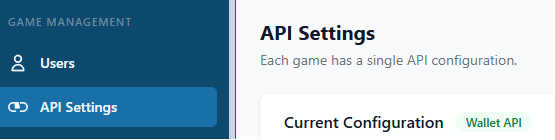
更换 Domain 前先暂停玩家进入,避免切换期间继续操作。Pause player access before changing the Domain so no one continues playing during the switch.
分别打开 Primary Domain 和 Backup Domain,确认两个网址都能正常进入。填写时请使用完整网址并保留 https://,只填写网站 Domain,不要加上登录页或其他页面路径。Open the Primary Domain and Backup Domain separately and confirm that both websites load normally. Enter the complete URL with https://, using only the website Domain without a login page or any other page path.
在 Current Configuration 填写要使用的 wallet website Domain。平时使用 Primary Domain;需要切换时,可改用已经确认可用的 Backup Domain。保存后重新打开 API Settings,确认网址没有填错。Enter the wallet website Domain to use under Current Configuration. Use the Primary Domain normally; switch to the verified Backup Domain when needed. Reopen API Settings after saving and confirm the URL is correct.
先关闭 Maintenance Mode,然后打开真实游戏链接,确认页面可以进入、用户资料和 token 正常显示。如果发现异常,请重新开启 Maintenance Mode,并通知管理员。Turn off Maintenance Mode first. Then open the real game link and confirm that the page opens and the user details and tokens display correctly. If anything is wrong, turn Maintenance Mode back on and contact your administrator.
Timezone 会影响每天、每周和每月的换日时间,也会影响排行榜、签到、任务、免费 token 和自动重置。Timezone affects daily, weekly and monthly rollover, including Ranking, Check-in, Mission, free tokens and scheduled resets.
选择活动实际使用的地区时区。马来西亚通常使用 Asia/Kuala_Lumpur;如果顾客使用其他地区,请先确认后再改。Choose the timezone used by the campaign. Malaysia normally uses Asia/Kuala_Lumpur; confirm first when the customer operates in another region.
检查后台显示时间和下一次重置时间。不要只看电脑本地时间。Check the time shown in the admin page and the next reset time. Do not rely only on the computer’s local clock.