OFF
用户按照当前 Active Game Setting 的正常奖品和 Probability 游玩。大部分用户使用这个模式。The user follows the rewards and Probability in the current Active Game Setting. This is the normal option for most users.
在 Users 页面新增用户、修改基本资料、调整 Bet Count,或为指定用户设置专属奖励。Use Users to add a user, update account details, adjust Bet Count or assign user-specific rewards.
从后台左侧菜单进入 Users。新增用户按 Add User;修改现有用户时,先搜索对应用户,再点击 Edit。Open Users from the left menu. Click Add User for a new account, or search for the relevant user and click Edit.
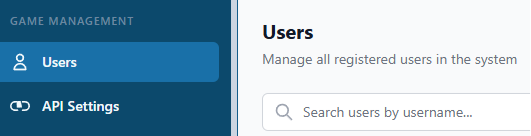
寻找用户时,请把 Domain User ID 开头的 A 换成数字 4,其余号码保持不变。例如:Domain User ID 是 A321,后台请输入 4321。When searching for a user, replace the first A in the Domain User ID with the number 4 and keep the remaining digits unchanged. Example: if the Domain User ID is A321, enter 4321.
修改现有用户时,先转换 User ID 再搜索。例如 A321 要输入 4321。打开 Edit 后再次确认用户资料,避免修改到其他账号。When editing an existing user, convert the User ID before searching. For example, enter 4321 for A321. After opening Edit, confirm the user details again to avoid changing the wrong account.
在 Bet Count 栏位填写用户需要保留的 token 数量。数值必须为 0 或以上;保存后重新打开用户资料,确认 Bet Count 正确。Enter the token amount the user should keep in the Bet Count field. The value must be 0 or higher. Save, then reopen the user and confirm the Bet Count is correct.
一般用户保持关闭,继续使用游戏 Setting 里的正常奖品和 Probability。只有指定用户需要不同安排时才开启。Leave this off for normal users so the game Setting controls rewards and Probability. Turn it on only when this user needs a different arrangement.
保存后重新打开用户资料,确认 Bet Count 和 Custom Rewards 没有填错。Reopen the user after saving and confirm the Bet Count and Custom Rewards are correct.

用户按照当前 Active Game Setting 的正常奖品和 Probability 游玩。大部分用户使用这个模式。The user follows the rewards and Probability in the current Active Game Setting. This is the normal option for most users.
可以为这个用户安排 Game Setting 里的特定奖品,或设置与一般用户不同的 Probability。这里只影响当前用户,不会更改其他人的游戏设置。You can assign specific rewards from the Game Setting or use a different Probability for this user. It affects this user only and does not change the main game setup for everyone else.
适合需要让指定用户使用某个现有奖品时。先确认奖品名称和 Reward Type,再保存。Use this when the user should receive a particular existing reward. Confirm the Reward Name and Reward Type before saving.
适合这个用户需要独立概率时。填写后检查页面显示的 Probability 是否完整,并先用该用户账号测试结果。Use this when the user needs separate probabilities. Check that all required Probability values are completed, then test with that user account.