Wallet API Logs
使用 User ID 查找 Angpao 记录,并查看请求是否成功或 API 是否无法连接。Search for Angpao records by User ID and check whether the request succeeded or the API could not be reached.
记录查询LOG LOOKUP
这里主要介绍两项常用记录:Wallet API Logs 用来查看 Angpao 请求状态,Activity Logs 用来查看 token 变动。This guide covers two commonly used records: Wallet API Logs for Angpao request status and Activity Logs for token changes.
在左侧菜单找到 Logs,再选择需要查看的记录。Open Logs from the left menu, then select the record you need.
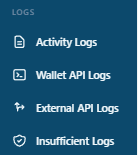
使用 User ID 查找 Angpao 记录,并查看请求是否成功或 API 是否无法连接。Search for Angpao records by User ID and check whether the request succeeded or the API could not be reached.
使用 User ID 查看 token 的增加与减少记录。Use the User ID to review token increase and decrease records.
通过 User ID 查找对应的 Angpao 请求,再查看该次请求的状态。Search by User ID to find the relevant Angpao request, then review its status.
请把 Domain User ID 开头的 A 换成数字 4,其余号码保持不变。例如:Domain User ID 是 A321,后台请输入 4321。Activity Logs 也使用相同的搜索方式。Replace the first A in the Domain User ID with the number 4 and keep the remaining digits unchanged. Example: if the Domain User ID is A321, enter 4321. Use the same search format in Activity Logs.
Activity Logs 会记录用户的 token 增加与减少,方便对照 token 的变动时间。Activity Logs record token increases and decreases, making it easier to check when a token change occurred.
请提供 User ID、操作时间和相关记录截图,让管理员继续检查。其他 Logs 属于技术记录,一般不需要自行处理。Provide the User ID, action time, and a screenshot of the relevant record so the administrator can continue checking. The other logs are technical records and normally do not require your action.